This document is for a deprecated release of Opendaylight and will receive only security updates.
This section describes how to use the SNBI feature in OpenDaylight and contains configuration, administration, and management section for the feature.
Key distribution in a scaled network has always been a challenge. Typically, operators must perform some manual key distribution process before secure communication is possible between a set of network devices. The Secure Network Bootstrapping Infrastructure (SNBI) project securely and automatically brings up an integrated set of network devices and controllers, simplifying the process of bootstrapping network devices with the keys required for secure communication. SNBI enables connectivity to the network devices by assigning unique IPv6 addresses and bootstrapping devices with the required keys. Admission control of devices into a specific domain is achieved using whitelist of authorized devices.
At a high level, SNBI architecture consists of the following components:
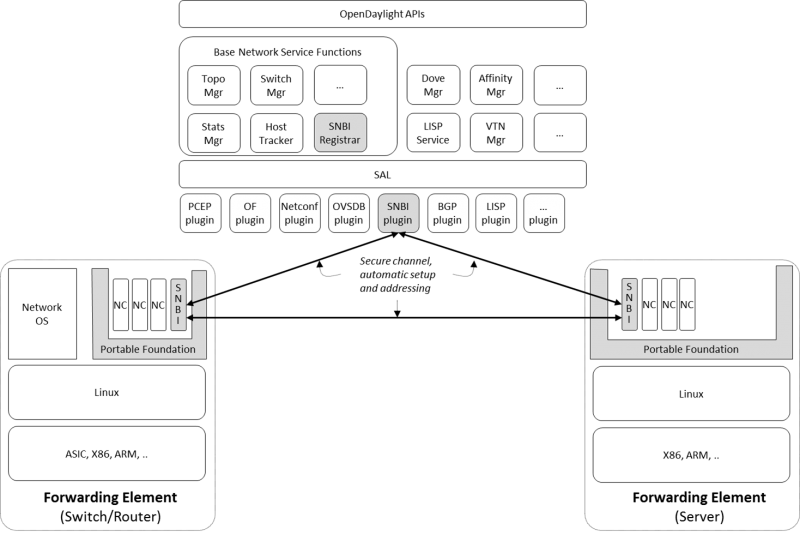
SNBI Architecture Diagram
Registrar is a device in a network that validates device against a whitelist and delivers device domain certificate. Registrar includes the following:
RESTCONF API for Domain Whitelist Configuration:.
Below is the YANG model to configure the whitelist of devices for a particular domain.
module snbi {
    //The yang version - today only 1 version exists. If omitted defaults to 1.
    yang-version 1;

    //a unique namespace for this SNBI module, to uniquely identify it from other modules that may have the same name.
    namespace "http://netconfcentral.org/ns/snbi";

    //a shorter prefix that represents the namespace for references used below
    prefix snbi;

    //Defines the organization which defined / owns this .yang file.
    organization "Netconf Central";

    //defines the primary contact of this yang file.
    contact "snbi-dev";

    //provides a description of this .yang file.
    description "YANG version for SNBI.";

    //defines the dates of revisions for this yang file
    revision "2024-07-02" {
        description "SNBI module";
    }

    typedef UDI {
        type string;
        description "Unique Device Identifier";
    }

    container snbi-domain {
        leaf domain-name {
            type string;
            description "The SNBI domain name";
        }

        list device-list {
            key "list-name";

            leaf list-name {
                type string;
                description "Name of the device list";
            }

            leaf list-type {
                type enumeration {
                    enum "white";
                }
                description "Indicates the type of the list";
            }

            leaf active {
                type boolean;
                description "Indicates whether the list is active or not";
            }

            list devices {
                key "device-identifier";
                leaf device-identifier {
                    type union {
                        type UDI;
                    }
                }
             }
         }
    }
}
Southbound Plugin:.
The Southbound Plugin implements the protocol state machine necessary to exchange device identifiers, and deliver certificates.
Certificate Authority:.
A simple certificate authority is implemented using the Bouncy Castle package. The Certificate Authority creates the certificates from the device CSR requests received from the devices. The certificates thus generated are delivered to the devices using the Southbound Plugin.
The forwarding element must be installed or unpacked on a Linux host whose network layer traffic must be secured. The FE performs the following functions:
Neighbour Discovery:.
Neighbour Discovery (ND) is the first step in accommodating devices in a secure network. SNBI performs periodic neighbour discovery of SNBI agents by transmitting ND hello packets. The discovered devices are populated in an ND table. Neighbour Discovery is periodic and bidirectional. ND hello packets are transmitted every 10 seconds. A 40 second refresh timer is set for each discovered neighbour. On expiry of the refresh timer, the Neighbour Adjacency is removed from the ND table as the Neighbour Adjacency is no longer valid. It is possible that the same SNBI neighbour is discovered on multiple links, the expiry of a device on one link does not automatically remove the device entry from the ND table.
Bootstrapping:.
Bootstrapping a device involves the following sequential steps:
Host Configuration:.
Involves configuring a host to create a secure overlay network, assigning appropriate ipv6 address, setting up gre tunnels, securing the tunnels traffic via IPsec and enabling connectivity via a routing protocol.
The SNBI Forwarding Element is packaged in a docker container available at this link: https://hub.docker.com/r/snbi/boron/. For more information on docker, refer to this link: https://docs.docker.com/linux/.
Before proceeding further, ensure that the following system requirements are met:
This section contains the following:
This section contains the following:
Configuring the Registrar Host:.
Before enabling the SNBI registrar service, assign an IPv6 address to an interface on the registrar host. This is to bind the registrar service to an IPv6 address (fd08::aaaa:bbbb:1/128).
sudo ip link add snbi-ra type dummy
sudo ip addr add fd08::aaaa:bbbb:1/128 dev snbi-ra
sudo ifconfig snbi-ra up
Installing Karaf Package:.
Download the karaf package from this link:
http://www.opendaylight.org/software/downloads, unzip and run the
karaf executable present in the bin folder. Here is an example of
this step:
cd distribution-karaf-0.3.0-Boron/bin
./karaf
Additional information on useful Karaf commands are available at this link: https://wiki.opendaylight.org/view/CrossProject:Integration_Group:karaf.
Configuring SNBI Registrar:.
Before you perform this step, ensure that you have completed the tasks above:
To use RESTCONF APIs, install the RESTCONF feature available in the Karaf package. If required, install mdsal-apidocs module for access to documentation. Refer https://wiki.opendaylight.org/view/OpenDaylight_Controller:MD-SAL:Restconf_API_Explorer for more information on MDSAL API docs.
Use the commands below to install the required features and verify the same.
feature:install odl-restconf
feature:install odl-mdsal-apidocs
feature:install odl-snbi-all
feature:list -i
After confirming that the features are installed, use the following command to start SNBI registrar:
snbi:start <domain-name>
The registrar must be configured with a whitelist of devices that are accommodated in a specific domain. The YANG for configuring the domain and the associated whitelist in the controller is avaialble at this link: https://wiki.opendaylight.org/view/SNBI_Architecture_and_Design#Registrar_YANG_Definition. It is recommended to use Postman to configure the registrar using RESTCONF.
This section contains the following:
Installing PostMan:.
Follow the steps below to install postman on your Google Chrome Browser.
You can download a sample Postman configuration to get started from this link: https://www.getpostman.com/collections/c929a2a4007ffd0a7b51
Configuring Whitelist using REST API:.
The POST method below configures a domain - “secure-domain” and configures a whitelist set of devices to be accommodated to the domain.
{
  "snbi-domain": {
    "domain-name": "secure-domain",
    "device-list": [
      {
        "list-name": "demo list",
        "list-type": "white",
        "active": true,
        "devices": [
          {
            "device-id": "UDI-FirstFE"
          },
          {
            "device-id": "UDI-dev1"
          },
          {
            "device-id": "UDI-dev2"
          }
        ]
      }
     ]
  }
}
The associated device ID must be configured on the SNBI FE (see below). You can also use REST APIs using the API docs interface to push the domain and whitelist information. The API docs could be accessed at link:http://localhost:8080/apidoc/explorer. More details on the API docs is available at link:https://wiki.opendaylight.org/view/OpenDaylight_Controller:MD-SAL:Restconf_API_Explorer
The SNBI Daemon is used to bootstrap the host device with a valid device domain certificate and IP address for connectivity and to create a reachable overlay network by interacting with multiple software modules.
Device UDI:.
The Device UDI or the device Unique Identifier can be derived from a multitude of parameters in the host machine, but most derived parameters are already known or do not remain constant across reloads. Therefore, every SNBI FE must be configured explicitly with a UDI that is present in the device whitelist.
First Forwarding Element:.
The registrar service IP address must be provided to the first host (Forwarding Element) to be bootstrapped. As mentioned in the “Configuring the Registrar Host” section, the registrar service IP address is fd08::aaaa:bbbb:1. The First Forwarding Element must be configured with this IPv6 address.
Running the SNBI docker image:.
The SNBI FE in the docker image picks the UDI of the ForwardingElement via an environment variable provided when executing docker instance. If the Forwarding Element is a first forwarding element, the IP address of the registrar service should also be provided.
sudo docker run -v /etc/timezone:/etc/timezone:ro --net=host --privileged=true
--rm -t -i -e SNBI_UDI=UDI-FirstFE  -e SNBI_REGISTRAR=fd08::aaaa:bbbb:1 snbi/boron:latest /bin/bash
After the docker image is executed, you are placed in the snbi.d command prompt.
A new Forwarding Element is bootstrapped in the same way, except that the registrar IP address is not required while running the docker image.
sudo docker run --net=host --privileged=true --rm -t -i -e SNBI_UDI=UDI-dev1 snbi/boron:latest /bin/bash
The SNBI daemon provides various show commands to verify the current state of the daemon. The commands are completed automatically when you press Tab in your keyboard. There are help strings ”?” to list commands.
snbi.d > show snbi
        device                Host deevice
        neighbors             SNBI Neighbors
        debugs                Debugs enabled
        certificate           Certificate information
