Service Function Chaining

OpenDaylight Service Function Chaining (SFC) Overview

OpenDaylight Service Function Chaining (SFC) provides the ability to define an ordered list of a network services (e.g. firewalls, load balancers). These service are then “stitched” together in the network to create a service chain. This project provides the infrastructure (chaining logic, APIs) needed for ODL to provision a service chain in the network and an end-user application for defining such chains.

  • ACE - Access Control Entry
  • ACL - Access Control List
  • SCF - Service Classifier Function
  • SF - Service Function
  • SFC - Service Function Chain
  • SFF - Service Function Forwarder
  • SFG - Service Function Group
  • SFP - Service Function Path
  • RSP - Rendered Service Path
  • NSH - Network Service Header

SFC User Interface

Overview

SFC User Interface (SFC-UI) is based on Dlux project. It provides an easy way to create, read, update and delete configuration stored in Datastore. Moreover, it shows the status of all SFC features (e.g installed, uninstalled) and Karaf log messages as well.

SFC-UI Architecture

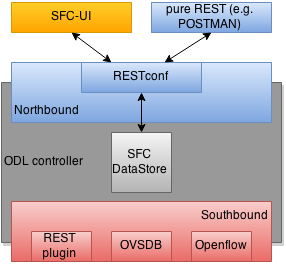
SFC-UI operates purely by using RESTCONF.

SFC-UI integration into ODL

SFC-UI integration into ODL

Configuring SFC-UI

  1. Run ODL distribution (run karaf)
  2. In karaf console execute: feature:install odl-sfc-ui
  3. Visit SFC-UI on: http://<odl_ip_address>:8181/sfc/index.html

SFC Southbound REST Plugin

Overview

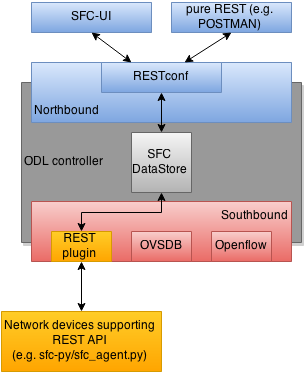
The Southbound REST Plugin is used to send configuration from DataStore down to network devices supporting a REST API (i.e. they have a configured REST URI). It supports POST/PUT/DELETE operations, which are triggered accordingly by changes in the SFC data stores.

  • Access Control List (ACL)
  • Service Classifier Function (SCF)
  • Service Function (SF)
  • Service Function Group (SFG)
  • Service Function Schedule Type (SFST)
  • Service Function Forwader (SFF)
  • Rendered Service Path (RSP)

Southbound REST Plugin Architecture

From the user perspective, the REST plugin is another SFC Southbound plugin used to communicate with network devices.

Soutbound REST Plugin integration into ODL

Soutbound REST Plugin integration into ODL

Configuring Southbound REST Plugin

  1. Run ODL distribution (run karaf)
  2. In karaf console execute: feature:install odl-sfc-sb-rest
  3. Configure REST URIs for SF/SFF through SFC User Interface or RESTCONF (required configuration steps can be found in the tutorial stated bellow)

Tutorial

Comprehensive tutorial on how to use the Southbound REST Plugin and how to control network devices with it can be found on: https://wiki.opendaylight.org/view/Service_Function_Chaining:Main#SFC_101

SFC-OVS integration

Overview

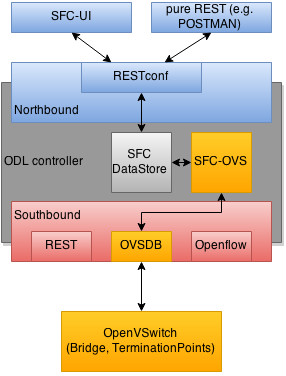
SFC-OVS provides integration of SFC with Open vSwitch (OVS) devices. Integration is realized through mapping of SFC objects (like SF, SFF, Classifier, etc.) to OVS objects (like Bridge, TerminationPoint=Port/Interface). The mapping takes care of automatic instantiation (setup) of corresponding object whenever its counterpart is created. For example, when a new SFF is created, the SFC-OVS plugin will create a new OVS bridge and when a new OVS Bridge is created, the SFC-OVS plugin will create a new SFF.

The feature is intended for SFC users willing to use Open vSwitch as underlying network infrastructure for deploying RSPs (Rendered Service Paths).

SFC-OVS Architecture

SFC-OVS uses the OVSDB MD-SAL Southbound API for getting/writing information from/to OVS devices. From the user perspective SFC-OVS acts as a layer between SFC DataStore and OVSDB.

SFC-OVS integration into ODL

SFC-OVS integration into ODL

Configuring SFC-OVS

  1. Run ODL distribution (run karaf)
  2. In karaf console execute: feature:install odl-sfc-ovs
  3. Configure Open vSwitch to use ODL as a manager, using following command: ovs-vsctl set-manager tcp:<odl_ip_address>:6640

Tutorials

Verifying mapping from OVS to SFF

Overview

This tutorial shows the usual workflow when OVS configuration is transformed to corresponding SFC objects (in this case SFF).

Prerequisities
  • Open vSwitch installed (ovs-vsctl command available in shell)
  • SFC-OVS feature configured as stated above
Instructions
  1. ovs-vsctl set-manager tcp:<odl_ip_address>:6640
  2. ovs-vsctl add-br br1
  3. ovs-vsctl add-port br1 testPort
Verification
  1. visit SFC User Interface: http://<odl_ip_address>:8181/sfc/index.html#/sfc/serviceforwarder
  2. use pure RESTCONF and send GET request to URL: http://<odl_ip_address>:8181/restconf/config/service-function-forwarder:service-function-forwarders

There should be SFF, which name will be ending with br1 and the SFF should containt two DataPlane locators: br1 and testPort.

Verifying mapping from SFF to OVS

Overview

This tutorial shows the usual workflow during creation of OVS Bridge with use of SFC APIs.

Prerequisities
  • Open vSwitch installed (ovs-vsctl command available in shell)
  • SFC-OVS feature configured as stated above
Instructions
  1. In shell execute: ovs-vsctl set-manager tcp:<odl_ip_address>:6640
  2. Send POST request to URL: http://<odl_ip_address>:8181/restconf/operations/service-function-forwarder-ovs:create-ovs-bridge Use Basic auth with credentials: “admin”, “admin” and set Content-Type: application/json. The content of POST request should be following:
{
    "input":
    {
        "name": "br-test",
        "ovs-node": {
            "ip": "<Open_vSwitch_ip_address>"
        }
    }
}

Open_vSwitch_ip_address is IP address of machine, where Open vSwitch is installed.

Verification

In shell execute: ovs-vsctl show. There should be Bridge with name br-test and one port/interface called br-test.

Also, corresponding SFF for this OVS Bridge should be configured, which can be verified through SFC User Interface or RESTCONF as stated in previous tutorial.

SFC Classifier User Guide

Overview

Description of classifier can be found in: https://datatracker.ietf.org/doc/draft-ietf-sfc-architecture/

There are two types of classifier:

  1. OpenFlow Classifier
  2. Iptables Classifier

OpenFlow Classifier

OpenFlow Classifier implements the classification criteria based on OpenFlow rules deployed into an OpenFlow switch. An Open vSwitch will take the role of a classifier and performs various encapsulations such NSH, VLAN, MPLS, etc. In the existing implementation, classifier can support NSH encapsulation. Matching information is based on ACL for MAC addresses, ports, protocol, IPv4 and IPv6. Supported protocols are TCP, UDP and SCTP. Actions information in the OF rules, shall be forwarding of the encapsulated packets with specific information related to the RSP.

Classifier Architecture

The OVSDB Southbound interface is used to create an instance of a bridge in a specific location (via IP address). This bridge contains the OpenFlow rules that perform the classification of the packets and react accordingly. The OpenFlow Southbound interface is used to translate the ACL information into OF rules within the Open vSwitch.

Note

in order to create the instance of the bridge that takes the role of a classifier, an “empty” SFF must be created.

Configuring Classifier

  1. An empty SFF must be created in order to host the ACL that contains the classification information.
  2. SFF data plane locator must be configured
  3. Classifier interface must be mannually added to SFF bridge.

Administering or Managing Classifier

Classification information is based on MAC addresses, protocol, ports and IP. ACL gathers this information and is assigned to an RSP which turns to be a specific path for a Service Chain.

Iptables Classifier

Classifier manages everything from starting the packet listener to creation (and removal) of appropriate ip(6)tables rules and marking received packets accordingly. Its functionality is available only on Linux as it leverdges NetfilterQueue, which provides access to packets matched by an iptables rule. Classifier requires root privileges to be able to operate.

So far it is capable of processing ACL for MAC addresses, ports, IPv4 and IPv6. Supported protocols are TCP and UDP.

Classifier Architecture

Python code located in the project repository sfc-py/common/classifier.py.

Note

classifier assumes that Rendered Service Path (RSP) already exists in ODL when an ACL referencing it is obtained

  1. sfc_agent receives an ACL and passes it for processing to the classifier
  2. the RSP (its SFF locator) referenced by ACL is requested from ODL
  3. if the RSP exists in the ODL then ACL based iptables rules for it are applied

After this process is over, every packet successfully matched to an iptables rule (i.e. successfully classified) will be NSH encapsulated and forwarded to a related SFF, which knows how to traverse the RSP.

Rules are created using appropriate iptables command. If the Access Control Entry (ACE) rule is MAC address related both iptables and ip6tabeles rules re issued. If ACE rule is IPv4 address related, only iptables rules are issued, same for IPv6.

Note

iptables raw table contains all created rules

Configuring Classifier

Classfier does’t need any configuration.
Its only requirement is that the second (2) Netfilter Queue is not used by any other process and is avalilable for the classifier.

Administering or Managing Classifier

Classfier runs alongside sfc_agent, therefore the commad for starting it locally is:

sudo python3.4 sfc-py/sfc_agent.py --rest --odl-ip-port localhost:8181 --auto-sff-name --nfq-class

SFC OpenFlow Renderer User Guide

Overview

The Service Function Chaining (SFC) OpenFlow Renderer (SFC OF Renderer) implements Service Chaining on OpenFlow switches. It listens for the creation of a Rendered Service Path (RSP), and once received it programs Service Function Forwarders (SFF) that are hosted on OpenFlow capable switches to steer packets through the service chain.

Common acronyms used in the following sections:

  • SF - Service Function
  • SFF - Service Function Forwarder
  • SFC - Service Function Chain
  • SFP - Service Function Path
  • RSP - Rendered Service Path

SFC OpenFlow Renderer Architecture

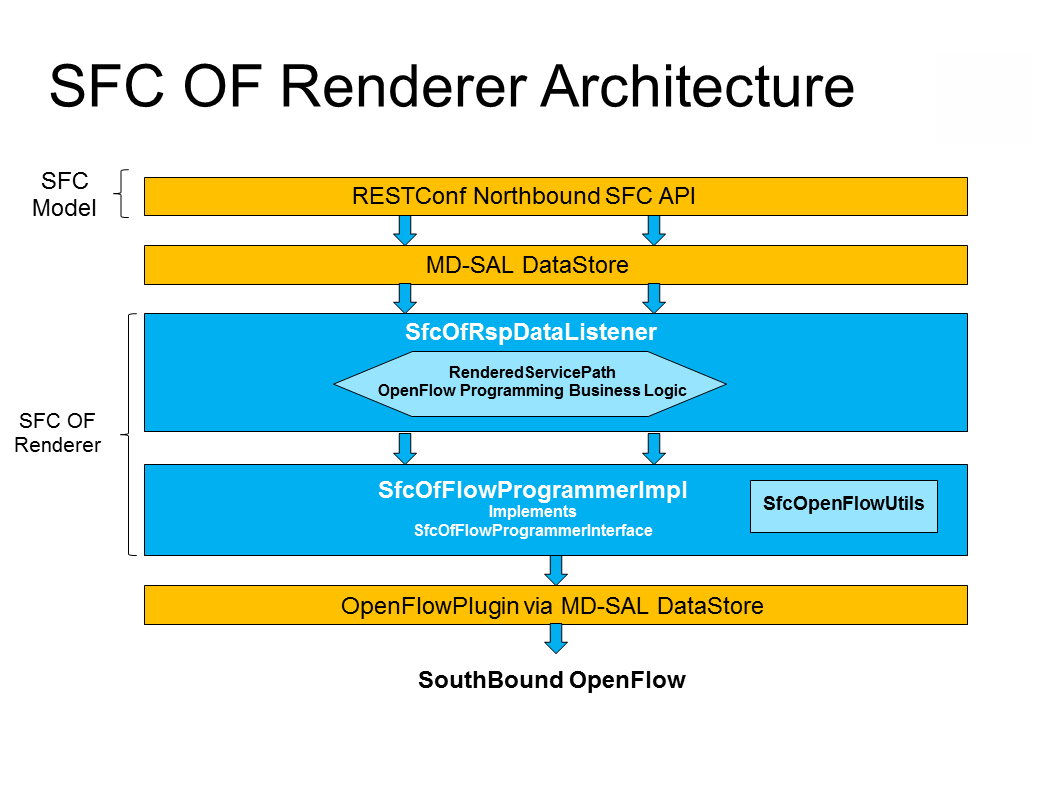
The SFC OF Renderer is invoked after a RSP is created using an MD-SAL listener called SfcOfRspDataListener. Upon SFC OF Renderer initialization, the SfcOfRspDataListener registers itself to listen for RSP changes. When invoked, the SfcOfRspDataListener processes the RSP and calls the SfcOfFlowProgrammerImpl to create the necessary flows in the Service Function Forwarders configured in the RSP. Refer to the following diagram for more details.

SFC OpenFlow Renderer High Level Architecture

SFC OpenFlow Renderer High Level Architecture

SFC OpenFlow Switch Flow pipeline

The SFC OpenFlow Renderer uses the following tables for its Flow pipeline:

  • Table 0, Classifier
  • Table 1, Transport Ingress
  • Table 2, Path Mapper
  • Table 3, Path Mapper ACL
  • Table 4, Next Hop
  • Table 10, Transport Egress

The OpenFlow Table Pipeline is intended to be generic to work for all of the different encapsulations supported by SFC.

All of the tables are explained in detail in the following section.

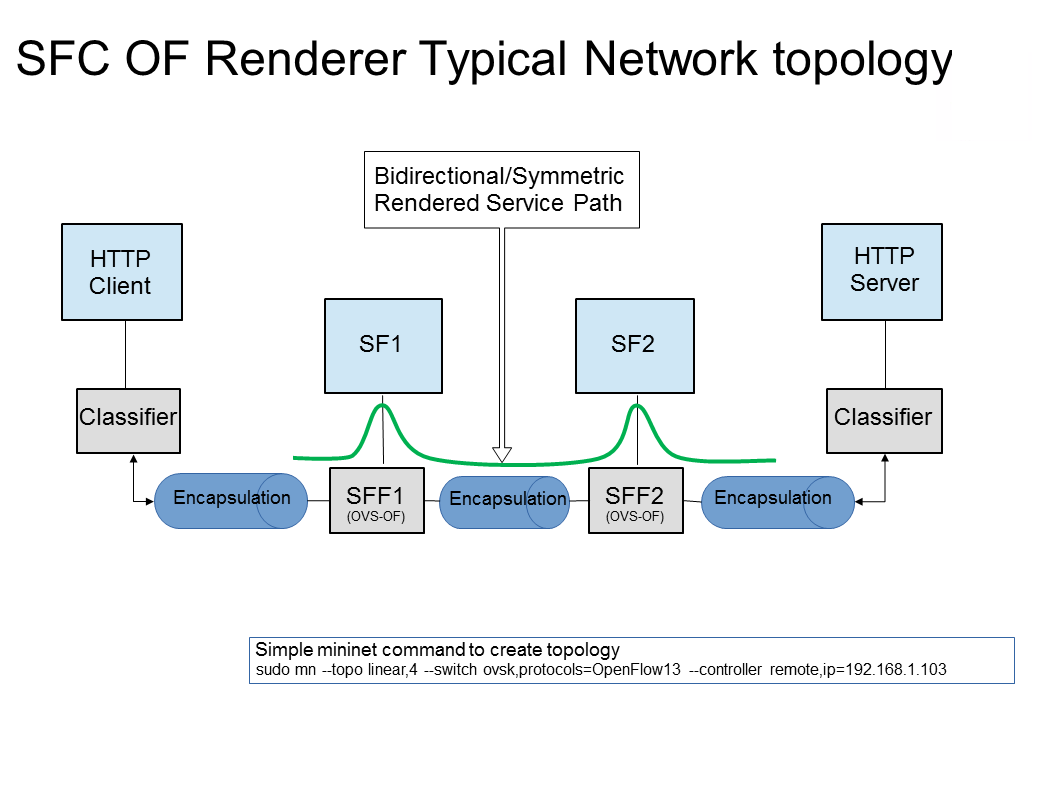
The SFFs (SFF1 and SFF2), SFs (SF1), and topology used for the flow tables in the following sections are as described in the following diagram.

SFC OpenFlow Renderer Typical Network Topology

SFC OpenFlow Renderer Typical Network Topology

Classifier Table detailed

It is possible for the SFF to also act as a classifier. This table maps subscriber traffic to RSPs, and is explained in detail in the classifier documentation.

If the SFF is not a classifier, then this table will just have a simple Goto Table 1 flow.

Transport Ingress Table detailed

The Transport Ingress table has an entry per expected tunnel transport type to be received in a particular SFF, as established in the SFC configuration.

Here are two example on SFF1: one where the RSP ingress tunnel is MPLS assuming VLAN is used for the SFF-SF, and the other where the RSP ingress tunnel is NSH GRE (UDP port 4789):

Priority Match Action
256 EtherType==0x8847 (MPLS unicast) Goto Table 2
256 EtherType==0x8100 (VLAN) Goto Table 2
256 EtherType==0x0800,udp,tp_dst==4789 (IP v4) Goto Table 2
5 Match Any Drop

Table: Table Transport Ingress

Path Mapper Table detailed

The Path Mapper table has an entry per expected tunnel transport info to be received in a particular SFF, as established in the SFC configuration. The tunnel transport info is used to determine the RSP Path ID, and is stored in the OpenFlow Metadata. This table is not used for NSH, since the RSP Path ID is stored in the NSH header.

For SF nodes that do not support NSH tunneling, the IP header DSCP field is used to store the RSP Path Id. The RSP Path Id is written to the DSCP field in the Transport Egress table for those packets sent to an SF.

Here is an example on SFF1, assuming the following details:

  • VLAN ID 1000 is used for the SFF-SF
  • The RSP Path 1 tunnel uses MPLS label 100 for ingress and 101 for egress
  • The RSP Path 2 (symmetric downlink path) uses MPLS label 101 for ingress and 100 for egress
Priority Match Action
256 MPLS Label==100 RSP Path=1, Pop MPLS, Goto Table 4
256 MPLS Label==101 RSP Path=2, Pop MPLS, Goto Table 4
256 VLAN ID==1000, IP DSCP==1 RSP Path=1, Pop VLAN, Goto Table 4
256 VLAN ID==1000, IP DSCP==2 RSP Path=2, Pop VLAN, Goto Table 4
5 Match Any Goto Table 3

Table: Table Path Mapper

Path Mapper ACL Table detailed

This table is only populated when PacketIn packets are received from the switch for TcpProxy type SFs. These flows are created with an inactivity timer of 60 seconds and will be automatically deleted upon expiration.

Next Hop Table detailed

The Next Hop table uses the RSP Path Id and appropriate packet fields to determine where to send the packet next. For NSH, only the NSP (Network Services Path, RSP ID) and NSI (Network Services Index, next hop) fields from the NSH header are needed to determine the VXLAN tunnel destination IP. For VLAN or MPLS, then the source MAC address is used to determine the destination MAC address.

Here are two examples on SFF1, assuming SFF1 is connected to SFF2. RSP Paths 1 and 2 are symmetric VLAN paths. RSP Paths 3 and 4 are symmetric NSH paths. RSP Path 1 ingress packets come from external to SFC, for which we don’t have the source MAC address (MacSrc).

Priority Match Action
256 RSP Path==1, MacSrc==SF1 MacDst=SFF2, Goto Table 10
256 RSP Path==2, MacSrc==SF1 Goto Table 10
256 RSP Path==2, MacSrc==SFF2 MacDst=SF1, Goto Table 10
246 RSP Path==1 MacDst=SF1, Goto Table 10
256 nsp=3,nsi=255 (SFF Ingress RSP 3) load:0xa000002→NXM_NX_TUN_I PV4_DST[], Goto Table 10
256 nsp=3,nsi=254 (SFF Ingress from SF, RSP 3) load:0xa00000a→NXM_NX_TUN_I PV4_DST[], Goto Table 10
256 nsp=4,nsi=254 (SFF1 Ingress from SFF2) load:0xa00000a→NXM_NX_TUN_I PV4_DST[], Goto Table 10
5 Match Any Drop

Table: Table Next Hop

Transport Egress Table detailed

The Transport Egress table prepares egress tunnel information and sends the packets out.

Here are two examples on SFF1. RSP Paths 1 and 2 are symmetric MPLS paths that use VLAN for the SFF-SF. RSP Paths 3 and 4 are symmetric NSH paths. Since it is assumed that switches used for NSH will only have one VXLANport, the NSH packets are just sent back where they came from.

Priority Match Action
256 RSP Path==1, MacDst==SF1 Push VLAN ID 1000, Port=SF1
256 RSP Path==1, MacDst==SFF2 Push MPLS Label 101, Port=SFF2
256 RSP Path==2, MacDst==SF1 Push VLAN ID 1000, Port=SF1
246 RSP Path==2 Push MPLS Label 100, Port=Ingress
256 nsp=3,nsi=255 (SFF Ingress RSP 3) IN_PORT
256 nsp=3,nsi=254 (SFF Ingress from SF, RSP 3) IN_PORT
256 nsp=4,nsi=254 (SFF1 Ingress from SFF2) IN_PORT
5 Match Any Drop

Table: Table Transport Egress

Administering SFC OF Renderer

To use the SFC OpenFlow Renderer Karaf, at least the following Karaf features must be installed.

  • odl-openflowplugin-nxm-extensions
  • odl-openflowplugin-flow-services
  • odl-sfc-provider
  • odl-sfc-model
  • odl-sfc-openflow-renderer
  • odl-sfc-ui (optional)

The following command can be used to view all of the currently installed Karaf features:

opendaylight-user@root>feature:list -i

Or, pipe the command to a grep to see a subset of the currently installed Karaf features:

opendaylight-user@root>feature:list -i | grep sfc

To install a particular feature, use the Karaf feature:install command.

SFC OF Renderer Tutorial

Overview

In this tutorial, 2 different encapsulations will be shown: MPLS and NSH. The following Network Topology diagram is a logical view of the SFFs and SFs involved in creating the Service Chains.

SFC OpenFlow Renderer Typical Network Topology

SFC OpenFlow Renderer Typical Network Topology

Prerequisites

To use this example, SFF OpenFlow switches must be created and connected as illustrated above. Additionally, the SFs must be created and connected.

Target Environment

The target environment is not important, but this use-case was created and tested on Linux.

Instructions

The steps to use this tutorial are as follows. The referenced configuration in the steps is listed in the following sections.

There are numerous ways to send the configuration. In the following configuration chapters, the appropriate curl command is shown for each configuration to be sent, including the URL.

Steps to configure the SFC OF Renderer tutorial:

  1. Send the SF RESTCONF configuration
  2. Send the SFF RESTCONF configuration
  3. Send the SFC RESTCONF configuration
  4. Send the SFP RESTCONF configuration
  5. Create the RSP with a RESTCONF RPC command

Once the configuration has been successfully created, query the Rendered Service Paths with either the SFC UI or via RESTCONF. Notice that the RSP is symmetrical, so the following 2 RSPs will be created:

  • sfc-path1
  • sfc-path1-Reverse

At this point the Service Chains have been created, and the OpenFlow Switches are programmed to steer traffic through the Service Chain. Traffic can now be injected from a client into the Service Chain. To debug problems, the OpenFlow tables can be dumped with the following commands, assuming SFF1 is called s1 and SFF2 is called s2.

sudo ovs-ofctl -O OpenFlow13  dump-flows s1
sudo ovs-ofctl -O OpenFlow13  dump-flows s2

In all the following configuration sections, replace the ${JSON} string with the appropriate JSON configuration. Also, change the localhost desintation in the URL accordingly.

SFC OF Renderer NSH Tutorial

The following configuration sections show how to create the different elements using NSH encapsulation.

NSH Service Function configuration

The Service Function configuration can be sent with the following command:

curl -i -H "Content-Type: application/json" -H "Cache-Control: no-cache" --data '${JSON}' -X PUT --user admin:admin http://localhost:8181/restconf/config/service-function:service-functions/

SF configuration JSON.

{
 "service-functions": {
   "service-function": [
     {
       "name": "sf1",
       "type": "http-header-enrichment",
       "nsh-aware": true,
       "ip-mgmt-address": "10.0.0.2",
       "sf-data-plane-locator": [
         {
           "name": "sf1dpl",
           "ip": "10.0.0.10",
           "port": 4789,
           "transport": "service-locator:vxlan-gpe",
           "service-function-forwarder": "sff1"
         }
       ]
     },
     {
       "name": "sf2",
       "type": "firewall",
       "nsh-aware": true,
       "ip-mgmt-address": "10.0.0.3",
       "sf-data-plane-locator": [
         {
           "name": "sf2dpl",
            "ip": "10.0.0.20",
            "port": 4789,
            "transport": "service-locator:vxlan-gpe",
           "service-function-forwarder": "sff2"
         }
       ]
     }
   ]
 }
}
NSH Service Function Forwarder configuration

The Service Function Forwarder configuration can be sent with the following command:

curl -i -H "Content-Type: application/json" -H "Cache-Control: no-cache" --data '${JSON}' -X PUT --user admin:admin http://localhost:8181/restconf/config/service-function-forwarder:service-function-forwarders/

SFF configuration JSON.

{
 "service-function-forwarders": {
   "service-function-forwarder": [
     {
       "name": "sff1",
       "service-node": "openflow:2",
       "sff-data-plane-locator": [
         {
           "name": "sff1dpl",
           "data-plane-locator":
           {
               "ip": "10.0.0.1",
               "port": 4789,
               "transport": "service-locator:vxlan-gpe"
           }
         }
       ],
       "service-function-dictionary": [
         {
           "name": "sf1",
           "sff-sf-data-plane-locator":
           {
               "sf-dpl-name": "sf1dpl",
               "sff-dpl-name": "sff1dpl"
           }
         }
       ]
     },
     {
       "name": "sff2",
       "service-node": "openflow:3",
       "sff-data-plane-locator": [
         {
           "name": "sff2dpl",
           "data-plane-locator":
           {
               "ip": "10.0.0.2",
               "port": 4789,
               "transport": "service-locator:vxlan-gpe"
           }
         }
       ],
       "service-function-dictionary": [
         {
           "name": "sf2",
           "sff-sf-data-plane-locator":
           {
               "sf-dpl-name": "sf2dpl",
               "sff-dpl-name": "sff2dpl"
           }
         }
       ]
     }
   ]
 }
}
NSH Service Function Chain configuration

The Service Function Chain configuration can be sent with the following command:

curl -i -H "Content-Type: application/json" -H "Cache-Control: no-cache" --data '${JSON}' -X PUT --user admin:admin http://localhost:8181/restconf/config/service-function-chain:service-function-chains/

SFC configuration JSON.

{
 "service-function-chains": {
   "service-function-chain": [
     {
       "name": "sfc-chain1",
       "symmetric": true,
       "sfc-service-function": [
         {
           "name": "hdr-enrich-abstract1",
           "type": "http-header-enrichment"
         },
         {
           "name": "firewall-abstract1",
           "type": "firewall"
         }
       ]
     }
   ]
 }
}
NSH Service Function Path configuration

The Service Function Path configuration can be sent with the following command:

curl -i -H "Content-Type: application/json" -H "Cache-Control: no-cache" --data '${JSON}' -X PUT --user admin:admin http://localhost:8181/restconf/config/service-function-path:service-function-paths/

SFP configuration JSON.

{
  "service-function-paths": {
    "service-function-path": [
      {
        "name": "sfc-path1",
        "service-chain-name": "sfc-chain1",
        "transport-type": "service-locator:vxlan-gpe",
        "symmetric": true
      }
    ]
  }
}
NSH Rendered Service Path creation
curl -i -H "Content-Type: application/json" -H "Cache-Control: no-cache" --data '${JSON}' -X POST --user admin:admin http://localhost:8181/restconf/operations/rendered-service-path:create-rendered-path/

RSP creation JSON.

{
 "input": {
     "name": "sfc-path1",
     "parent-service-function-path": "sfc-path1",
     "symmetric": true
 }
}
NSH Rendered Service Path removal

The following command can be used to remove a Rendered Service Path called sfc-path1:

curl -i -H "Content-Type: application/json" -H "Cache-Control: no-cache" --data '{"input": {"name": "sfc-path1" } }' -X POST --user admin:admin http://localhost:8181/restconf/operations/rendered-service-path:delete-rendered-path/
NSH Rendered Service Path Query

The following command can be used to query all of the created Rendered Service Paths:

curl -H "Content-Type: application/json" -H "Cache-Control: no-cache" -X GET --user admin:admin http://localhost:8181/restconf/operational/rendered-service-path:rendered-service-paths/
SFC OF Renderer MPLS Tutorial

The following configuration sections show how to create the different elements using MPLS encapsulation.

MPLS Service Function configuration

The Service Function configuration can be sent with the following command:

curl -i -H "Content-Type: application/json" -H "Cache-Control: no-cache" --data '${JSON}' -X PUT --user admin:admin http://localhost:8181/restconf/config/service-function:service-functions/

SF configuration JSON.

{
 "service-functions": {
   "service-function": [
     {
       "name": "sf1",
       "type": "http-header-enrichment",
       "nsh-aware": false,
       "ip-mgmt-address": "10.0.0.2",
       "sf-data-plane-locator": [
         {
           "name": "sf1-sff1",
           "mac": "00:00:08:01:02:01",
           "vlan-id": 1000,
           "transport": "service-locator:mac",
           "service-function-forwarder": "sff1"
         }
       ]
     },
     {
       "name": "sf2",
       "type": "firewall",
       "nsh-aware": false,
       "ip-mgmt-address": "10.0.0.3",
       "sf-data-plane-locator": [
         {
           "name": "sf2-sff2",
           "mac": "00:00:08:01:03:01",
           "vlan-id": 2000,
           "transport": "service-locator:mac",
           "service-function-forwarder": "sff2"
         }
       ]
     }
   ]
 }
}
MPLS Service Function Forwarder configuration

The Service Function Forwarder configuration can be sent with the following command:

curl -i -H "Content-Type: application/json" -H "Cache-Control: no-cache" --data '${JSON}' -X PUT --user admin:admin http://localhost:8181/restconf/config/service-function-forwarder:service-function-forwarders/

SFF configuration JSON.

{
 "service-function-forwarders": {
   "service-function-forwarder": [
     {
       "name": "sff1",
       "service-node": "openflow:2",
       "sff-data-plane-locator": [
         {
           "name": "ulSff1Ingress",
           "data-plane-locator":
           {
               "mpls-label": 100,
               "transport": "service-locator:mpls"
           },
           "service-function-forwarder-ofs:ofs-port":
           {
               "mac": "11:11:11:11:11:11",
               "port-id" : "1"
           }
         },
         {
           "name": "ulSff1ToSff2",
           "data-plane-locator":
           {
               "mpls-label": 101,
               "transport": "service-locator:mpls"
           },
           "service-function-forwarder-ofs:ofs-port":
           {
               "mac": "33:33:33:33:33:33",
               "port-id" : "2"
           }
         },
         {
           "name": "toSf1",
           "data-plane-locator":
           {
               "mac": "22:22:22:22:22:22",
               "vlan-id": 1000,
               "transport": "service-locator:mac",
           },
           "service-function-forwarder-ofs:ofs-port":
           {
               "mac": "33:33:33:33:33:33",
               "port-id" : "3"
           }
         }
       ],
       "service-function-dictionary": [
         {
           "name": "sf1",
           "sff-sf-data-plane-locator":
           {
               "sf-dpl-name": "sf1-sff1",
               "sff-dpl-name": "toSf1"
           }
         }
       ]
     },
     {
       "name": "sff2",
       "service-node": "openflow:3",
       "sff-data-plane-locator": [
         {
           "name": "ulSff2Ingress",
           "data-plane-locator":
           {
               "mpls-label": 101,
               "transport": "service-locator:mpls"
           },
           "service-function-forwarder-ofs:ofs-port":
           {
               "mac": "44:44:44:44:44:44",
               "port-id" : "1"
           }
         },
         {
           "name": "ulSff2Egress",
           "data-plane-locator":
           {
               "mpls-label": 102,
               "transport": "service-locator:mpls"
           },
           "service-function-forwarder-ofs:ofs-port":
           {
               "mac": "66:66:66:66:66:66",
               "port-id" : "2"
           }
         },
         {
           "name": "toSf2",
           "data-plane-locator":
           {
               "mac": "55:55:55:55:55:55",
               "vlan-id": 2000,
               "transport": "service-locator:mac"
           },
           "service-function-forwarder-ofs:ofs-port":
           {
               "port-id" : "3"
           }
         }
       ],
       "service-function-dictionary": [
         {
           "name": "sf2",
           "sff-sf-data-plane-locator":
           {
               "sf-dpl-name": "sf2-sff2",
               "sff-dpl-name": "toSf2"

           },
           "service-function-forwarder-ofs:ofs-port":
           {
               "port-id" : "3"
           }
         }
       ]
     }
   ]
 }
}
MPLS Service Function Chain configuration

The Service Function Chain configuration can be sent with the following command:

curl -i -H "Content-Type: application/json" -H "Cache-Control: no-cache" --data '${JSON}' -X PUT --user admin:admin http://localhost:8181/restconf/config/service-function-chain:service-function-chains/

SFC configuration JSON.

{
 "service-function-chains": {
   "service-function-chain": [
     {
       "name": "sfc-chain1",
       "symmetric": true,
       "sfc-service-function": [
         {
           "name": "hdr-enrich-abstract1",
           "type": "http-header-enrichment"
         },
         {
           "name": "firewall-abstract1",
           "type": "firewall"
         }
       ]
     }
   ]
 }
}
MPLS Service Function Path configuration

The Service Function Path configuration can be sent with the following command:

curl -i -H "Content-Type: application/json" -H "Cache-Control: no-cache" --data '${JSON}' -X PUT --user admin:admin http://localhost:8181/restconf/config/service-function-path:service-function-paths/

SFP configuration JSON.

{
  "service-function-paths": {
    "service-function-path": [
      {
        "name": "sfc-path1",
        "service-chain-name": "sfc-chain1",
        "transport-type": "service-locator:mpls",
        "symmetric": true
      }
    ]
  }
}
MPLS Rendered Service Path creation
curl -i -H "Content-Type: application/json" -H "Cache-Control: no-cache" --data '${JSON}' -X POST --user admin:admin http://localhost:8181/restconf/operations/rendered-service-path:create-rendered-path/

RSP creation JSON.

{
 "input": {
     "name": "sfc-path1",
     "parent-service-function-path": "sfc-path1",
     "symmetric": true
 }
}
MPLS Rendered Service Path removal

The following command can be used to remove a Rendered Service Path called sfc-path1:

curl -i -H "Content-Type: application/json" -H "Cache-Control: no-cache" --data '{"input": {"name": "sfc-path1" } }' -X POST --user admin:admin http://localhost:8181/restconf/operations/rendered-service-path:delete-rendered-path/
MPLS Rendered Service Path Query

The following command can be used to query all of the created Rendered Service Paths:

curl -H "Content-Type: application/json" -H "Cache-Control: no-cache" -X GET --user admin:admin http://localhost:8181/restconf/operational/rendered-service-path:rendered-service-paths/

SFC IOS XE Renderer User Guide

Overview

The early Service Function Chaining (SFC) renderer for IOS-XE devices (SFC IOS-XE renderer) implements Service Chaining functionality on IOS-XE capable switches. It listens for the creation of a Rendered Service Path (RSP) and sets up Service Function Forwarders (SFF) that are hosted on IOS-XE switches to steer traffic through the service chain.

Common acronyms used in the following sections:

  • SF - Service Function
  • SFF - Service Function Forwarder
  • SFC - Service Function Chain
  • SP - Service Path
  • SFP - Service Function Path
  • RSP - Rendered Service Path
  • LSF - Local Service Forwarder
  • RSF - Remote Service Forwarder

SFC IOS-XE Renderer Architecture

When the SFC IOS-XE renderer is initialized, all required listeners are registered to handle incoming data. It involves CSR/IOS-XE NodeListener which stores data about all configurable devices including their mountpoints (used here as databrokers), ServiceFunctionListener, ServiceForwarderListener (see mapping) and RenderedPathListener used to listen for RSP changes. When the SFC IOS-XE renderer is invoked, RenderedPathListener calls the IosXeRspProcessor which processes the RSP change and creates all necessary Service Paths and Remote Service Forwarders (if necessary) on IOS-XE devices.

Service Path details

Each Service Path is defined by index (represented by NSP) and contains service path entries. Each entry has appropriate service index (NSI) and definition of next hop. Next hop can be Service Function, different Service Function Forwarder or definition of end of chain - terminate. After terminating, the packet is sent to destination. If a SFF is defined as a next hop, it has to be present on device in the form of Remote Service Forwarder. RSFs are also created during RSP processing.

Example of Service Path:

service-chain service-path 200
   service-index 255 service-function firewall-1
   service-index 254 service-function dpi-1
   service-index 253 terminate

Mapping to IOS-XE SFC entities

Renderer contains mappers for SFs and SFFs. IOS-XE capable device is using its own definition of Service Functions and Service Function Forwarders according to appropriate .yang file. ServiceFunctionListener serves as a listener for SF changes. If SF appears in datastore, listener extracts its management ip address and looks into cached IOS-XE nodes. If some of available nodes match, Service function is mapped in IosXeServiceFunctionMapper to be understandable by IOS-XE device and it’s written into device’s config. ServiceForwarderListener is used in a similar way. All SFFs with suitable management ip address it mapped in IosXeServiceForwarderMapper. Remapped SFFs are configured as a Local Service Forwarders. It is not possible to directly create Remote Service Forwarder using IOS-XE renderer. RSF is created only during RSP processing.

Administering SFC IOS-XE renderer

To use the SFC IOS-XE Renderer Karaf, at least the following Karaf features must be installed:

  • odl-aaa-shiro
  • odl-sfc-model
  • odl-sfc-provider
  • odl-restconf
  • odl-netconf-topology
  • odl-sfc-ios-xe-renderer

SFC IOS-XE renderer Tutorial

Overview

This tutorial is a simple example how to create Service Path on IOS-XE capable device using IOS-XE renderer

Preconditions

To connect to IOS-XE device, it is necessary to use several modified yang models and override device’s ones. All .yang files are in the Yang/netconf folder in the sfc-ios-xe-renderer module in the SFC project. These files have to be copied to the cache/schema directory, before Karaf is started. After that, custom capabilities have to be sent to network-topology:

PUT ./config/network-topology:network-topology/topology/topology-netconf/node/<device-name>

<node xmlns="urn:TBD:params:xml:ns:yang:network-topology">
  <node-id>device-name</node-id>
  <host xmlns="urn:opendaylight:netconf-node-topology">device-ip</host>
  <port xmlns="urn:opendaylight:netconf-node-topology">2022</port>
  <username xmlns="urn:opendaylight:netconf-node-topology">login</username>
  <password xmlns="urn:opendaylight:netconf-node-topology">password</password>
  <tcp-only xmlns="urn:opendaylight:netconf-node-topology">false</tcp-only>
  <keepalive-delay xmlns="urn:opendaylight:netconf-node-topology">0</keepalive-delay>
  <yang-module-capabilities xmlns="urn:opendaylight:netconf-node-topology">
     <override>true</override>
     <capability xmlns="urn:opendaylight:netconf-node-topology">
        urn:ietf:params:xml:ns:yang:ietf-inet-types?module=ietf-inet-types&amp;revision=2013-07-15
     </capability>
     <capability xmlns="urn:opendaylight:netconf-node-topology">
        urn:ietf:params:xml:ns:yang:ietf-yang-types?module=ietf-yang-types&amp;revision=2013-07-15
     </capability>
     <capability xmlns="urn:opendaylight:netconf-node-topology">
        urn:ios?module=ned&amp;revision=2016-03-08
     </capability>
     <capability xmlns="urn:opendaylight:netconf-node-topology">
        http://tail-f.com/yang/common?module=tailf-common&amp;revision=2015-05-22
     </capability>
     <capability xmlns="urn:opendaylight:netconf-node-topology">
        http://tail-f.com/yang/common?module=tailf-meta-extensions&amp;revision=2013-11-07
     </capability>
     <capability xmlns="urn:opendaylight:netconf-node-topology">
        http://tail-f.com/yang/common?module=tailf-cli-extensions&amp;revision=2015-03-19
     </capability>
  </yang-module-capabilities>
</node>

Note

The device name in the URL and in the XML must match.

Instructions

When the IOS-XE renderer is installed, all NETCONF nodes in topology-netconf are processed and all capable nodes with accessible mountpoints are cached. The first step is to create LSF on node.

Service Function Forwarder configuration

PUT ./config/service-function-forwarder:service-function-forwarders

{
    "service-function-forwarders": {
        "service-function-forwarder": [
            {
                "name": "CSR1Kv-2",
                "ip-mgmt-address": "172.25.73.23",
                "sff-data-plane-locator": [
                    {
                        "name": "CSR1Kv-2-dpl",
                        "data-plane-locator": {
                            "transport": "service-locator:vxlan-gpe",
                            "port": 6633,
                            "ip": "10.99.150.10"
                        }
                    }
                ]
            }
        ]
    }
}

If the IOS-XE node with appropriate management IP exists, this configuration is mapped and LSF is created on the device. The same approach is used for Service Functions.

PUT ./config/service-function:service-functions

{
    "service-functions": {
        "service-function": [
            {
                "name": "Firewall",
                "ip-mgmt-address": "172.25.73.23",
                "type": "service-function-type: firewall",
                "nsh-aware": true,
                "sf-data-plane-locator": [
                    {
                        "name": "firewall-dpl",
                        "port": 6633,
                        "ip": "12.1.1.2",
                        "transport": "service-locator:gre",
                        "service-function-forwarder": "CSR1Kv-2"
                    }
                ]
            },
            {
                "name": "Dpi",
                "ip-mgmt-address": "172.25.73.23",
                "type":"service-function-type: dpi",
                "nsh-aware": true,
                "sf-data-plane-locator": [
                    {
                        "name": "dpi-dpl",
                        "port": 6633,
                        "ip": "12.1.1.1",
                        "transport": "service-locator:gre",
                        "service-function-forwarder": "CSR1Kv-2"
                    }
                ]
            },
            {
                "name": "Qos",
                "ip-mgmt-address": "172.25.73.23",
                "type":"service-function-type: qos",
                "nsh-aware": true,
                "sf-data-plane-locator": [
                    {
                        "name": "qos-dpl",
                        "port": 6633,
                        "ip": "12.1.1.4",
                        "transport": "service-locator:gre",
                        "service-function-forwarder": "CSR1Kv-2"
                    }
                ]
            }
        ]
    }
}

All these SFs are configured on the same device as the LSF. The next step is to prepare Service Function Chain. SFC is symmetric.

PUT ./config/service-function-chain:service-function-chains/

{
    "service-function-chains": {
        "service-function-chain": [
            {
                "name": "CSR3XSF",
                "symmetric": "true",
                "sfc-service-function": [
                    {
                        "name": "Firewall",
                        "type": "service-function-type: firewall"
                    },
                    {
                        "name": "Dpi",
                        "type": "service-function-type: dpi"
                    },
                    {
                        "name": "Qos",
                        "type": "service-function-type: qos"
                    }
                ]
            }
        ]
    }
}

Service Function Path:

PUT ./config/service-function-path:service-function-paths/

{
    "service-function-paths": {
        "service-function-path": [
            {
                "name": "CSR3XSF-Path",
                "service-chain-name": "CSR3XSF",
                "starting-index": 255,
                "symmetric": "true"
            }
        ]
    }
}

Without a classifier, there is possibility to POST RSP directly.

POST ./operations/rendered-service-path:create-rendered-path

{
  "input": {
      "name": "CSR3XSF-Path-RSP",
      "parent-service-function-path": "CSR3XSF-Path",
      "symmetric": true
  }
}

The resulting configuration:

!
service-chain service-function-forwarder local
  ip address 10.99.150.10
!
service-chain service-function firewall
ip address 12.1.1.2
  encapsulation gre enhanced divert
!
service-chain service-function dpi
ip address 12.1.1.1
  encapsulation gre enhanced divert
!
service-chain service-function qos
ip address 12.1.1.4
  encapsulation gre enhanced divert
!
service-chain service-path 1
  service-index 255 service-function firewall
  service-index 254 service-function dpi
  service-index 253 service-function qos
  service-index 252 terminate
!
service-chain service-path 2
  service-index 255 service-function qos
  service-index 254 service-function dpi
  service-index 253 service-function firewall
  service-index 252 terminate
!

Service Path 1 is direct, Service Path 2 is reversed. Path numbers may vary.

Service Function Scheduling Algorithms

Overview

When creating the Rendered Service Path, the origin SFC controller chose the first available service function from a list of service function names. This may result in many issues such as overloaded service functions and a longer service path as SFC has no means to understand the status of service functions and network topology. The service function selection framework supports at least four algorithms (Random, Round Robin, Load Balancing and Shortest Path) to select the most appropriate service function when instantiating the Rendered Service Path. In addition, it is an extensible framework that allows 3rd party selection algorithm to be plugged in.

Architecture

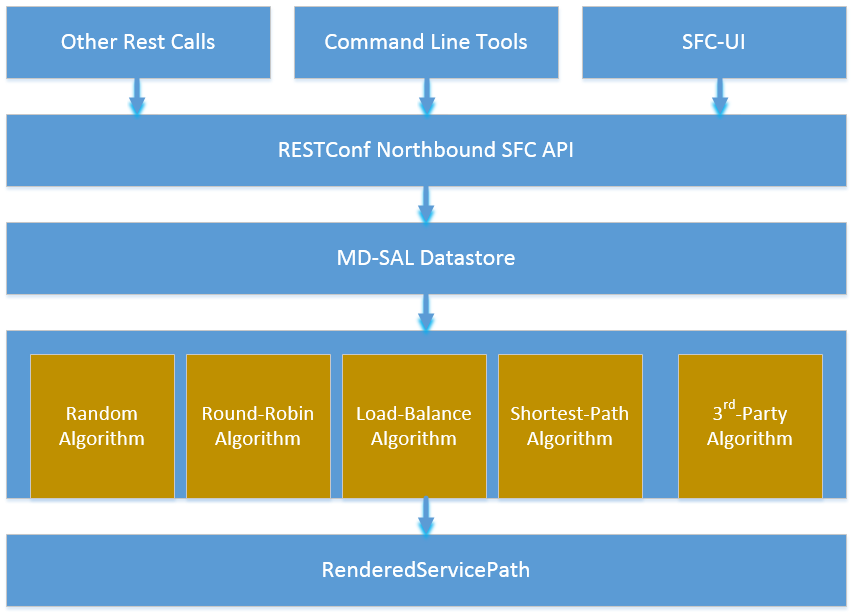
The following figure illustrates the service function selection framework and algorithms.

SF Selection Architecture

SF Selection Architecture

A user has three different ways to select one service function selection algorithm:

  1. Integrated RESTCONF Calls. OpenStack and/or other administration system could provide plugins to call the APIs to select one scheduling algorithm.
  2. Command line tools. Command line tools such as curl or browser plugins such as POSTMAN (for Google Chrome) and RESTClient (for Mozilla Firefox) could select schedule algorithm by making RESTCONF calls.
  3. SFC-UI. Now the SFC-UI provides an option for choosing a selection algorithm when creating a Rendered Service Path.

The RESTCONF northbound SFC API provides GUI/RESTCONF interactions for choosing the service function selection algorithm. MD-SAL data store provides all supported service function selection algorithms, and provides APIs to enable one of the provided service function selection algorithms. Once a service function selection algorithm is enabled, the service function selection algorithm will work when creating a Rendered Service Path.

Select SFs with Scheduler

Administrator could use both the following ways to select one of the selection algorithm when creating a Rendered Service Path.

  • Command line tools. Command line tools includes Linux commands curl or even browser plugins such as POSTMAN(for Google Chrome) or RESTClient(for Mozilla Firefox). In this case, the following JSON content is needed at the moment: Service_function_schudule_type.json

    {
      "service-function-scheduler-types": {
        "service-function-scheduler-type": [
          {
            "name": "random",
            "type": "service-function-scheduler-type:random",
            "enabled": false
          },
          {
            "name": "roundrobin",
            "type": "service-function-scheduler-type:round-robin",
            "enabled": true
          },
          {
            "name": "loadbalance",
            "type": "service-function-scheduler-type:load-balance",
            "enabled": false
          },
          {
            "name": "shortestpath",
            "type": "service-function-scheduler-type:shortest-path",
            "enabled": false
          }
        ]
      }
    }
    

    If using the Linux curl command, it could be:

    curl -i -H "Content-Type: application/json" -H "Cache-Control: no-cache" --data '$${Service_function_schudule_type.json}'
    -X PUT --user admin:admin http://localhost:8181/restconf/config/service-function-scheduler-type:service-function-scheduler-types/
    

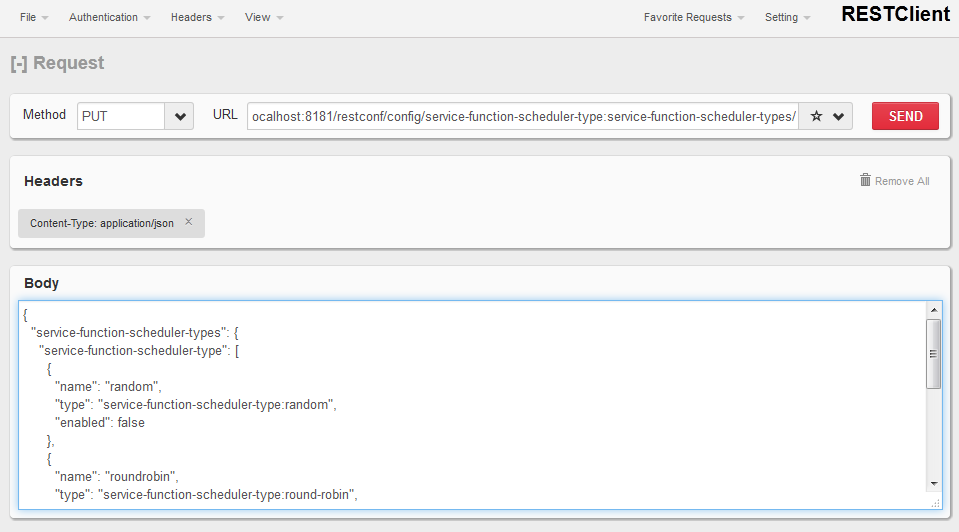
    Here is also a snapshot for using the RESTClient plugin:

Mozilla Firefox RESTClient

Mozilla Firefox RESTClient

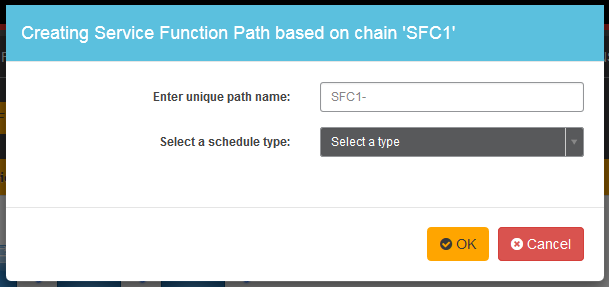
  • SFC-UI.SFC-UI provides a drop down menu for service function selection algorithm. Here is a snapshot for the user interaction from SFC-UI when creating a Rendered Service Path.
Karaf Web UI

Karaf Web UI

Note

Some service function selection algorithms in the drop list are not implemented yet. Only the first three algorithms are committed at the moment.

Random

Select Service Function from the name list randomly.

Overview

The Random algorithm is used to select one Service Function from the name list which it gets from the Service Function Type randomly.

Prerequisites
  • Service Function information are stored in datastore.
  • Either no algorithm or the Random algorithm is selected.
Target Environment

The Random algorithm will work either no algorithm type is selected or the Random algorithm is selected.

Instructions

Once the plugins are installed into Karaf successfully, a user can use his favorite method to select the Random scheduling algorithm type. There are no special instructions for using the Random algorithm.

Round Robin

Select Service Function from the name list in Round Robin manner.

Overview

The Round Robin algorithm is used to select one Service Function from the name list which it gets from the Service Function Type in a Round Robin manner, this will balance workloads to all Service Functions. However, this method cannot help all Service Functions load the same workload because it’s flow-based Round Robin.

Prerequisites
  • Service Function information are stored in datastore.
  • Round Robin algorithm is selected
Target Environment

The Round Robin algorithm will work one the Round Robin algorithm is selected.

Instructions

Once the plugins are installed into Karaf successfully, a user can use his favorite method to select the Round Robin scheduling algorithm type. There are no special instructions for using the Round Robin algorithm.

Load Balance Algorithm

Select appropriate Service Function by actual CPU utilization.

Overview

The Load Balance Algorithm is used to select appropriate Service Function by actual CPU utilization of service functions. The CPU utilization of service function obtained from monitoring information reported via NETCONF.

Prerequisites
  • CPU-utilization for Service Function.
  • NETCONF server.
  • NETCONF client.
  • Each VM has a NETCONF server and it could work with NETCONF client well.
Instructions

Set up VMs as Service Functions. enable NETCONF server in VMs. Ensure that you specify them separately. For example:

  1. Set up 4 VMs include 2 SFs’ type are Firewall, Others are Napt44. Name them as firewall-1, firewall-2, napt44-1, napt44-2 as Service Function. The four VMs can run either the same server or different servers.
  2. Install NETCONF server on every VM and enable it. More information on NETCONF can be found on the OpenDaylight wiki here: https://wiki.opendaylight.org/view/OpenDaylight_Controller:Config:Examples:Netconf:Manual_netopeer_installation
  3. Get Monitoring data from NETCONF server. These monitoring data should be get from the NETCONF server which is running in VMs. The following static XML data is an example:

static XML data like this:

<?xml version="1.0" encoding="UTF-8"?>
<service-function-description-monitor-report>
  <SF-description>
    <number-of-dataports>2</number-of-dataports>
    <capabilities>
      <supported-packet-rate>5</supported-packet-rate>
      <supported-bandwidth>10</supported-bandwidth>
      <supported-ACL-number>2000</supported-ACL-number>
      <RIB-size>200</RIB-size>
      <FIB-size>100</FIB-size>
      <ports-bandwidth>
        <port-bandwidth>
          <port-id>1</port-id>
          <ipaddress>10.0.0.1</ipaddress>
          <macaddress>00:1e:67:a2:5f:f4</macaddress>
          <supported-bandwidth>20</supported-bandwidth>
        </port-bandwidth>
        <port-bandwidth>
          <port-id>2</port-id>
          <ipaddress>10.0.0.2</ipaddress>
          <macaddress>01:1e:67:a2:5f:f6</macaddress>
          <supported-bandwidth>10</supported-bandwidth>
        </port-bandwidth>
      </ports-bandwidth>
    </capabilities>
  </SF-description>
  <SF-monitoring-info>
    <liveness>true</liveness>
    <resource-utilization>
        <packet-rate-utilization>10</packet-rate-utilization>
        <bandwidth-utilization>15</bandwidth-utilization>
        <CPU-utilization>12</CPU-utilization>
        <memory-utilization>17</memory-utilization>
        <available-memory>8</available-memory>
        <RIB-utilization>20</RIB-utilization>
        <FIB-utilization>25</FIB-utilization>
        <power-utilization>30</power-utilization>
        <SF-ports-bandwidth-utilization>
          <port-bandwidth-utilization>
            <port-id>1</port-id>
            <bandwidth-utilization>20</bandwidth-utilization>
          </port-bandwidth-utilization>
          <port-bandwidth-utilization>
            <port-id>2</port-id>
            <bandwidth-utilization>30</bandwidth-utilization>
          </port-bandwidth-utilization>
        </SF-ports-bandwidth-utilization>
    </resource-utilization>
  </SF-monitoring-info>
</service-function-description-monitor-report>
  1. Unzip SFC release tarball.
  2. Run SFC: ${sfc}/bin/karaf. More information on Service Function Chaining can be found on the OpenDaylight SFC’s wiki page: https://wiki.opendaylight.org/view/Service_Function_Chaining:Main
  1. Deploy the SFC2 (firewall-abstract2⇒napt44-abstract2) and click button to Create Rendered Service Path in SFC UI (http://localhost:8181/sfc/index.html).
  2. Verify the Rendered Service Path to ensure the CPU utilization of the selected hop is the minimum one among all the service functions with same type. The correct RSP is firewall-1⇒napt44-2

Shortest Path Algorithm

Select appropriate Service Function by Dijkstra’s algorithm. Dijkstra’s algorithm is an algorithm for finding the shortest paths between nodes in a graph.

Overview

The Shortest Path Algorithm is used to select appropriate Service Function by actual topology.

Prerequisites
Instructions
  1. Unzip SFC release tarball.
  2. Run SFC: ${sfc}/bin/karaf.
  3. Depoly SFFs and SFs. import the service-function-forwarders.json and service-functions.json in UI (http://localhost:8181/sfc/index.html#/sfc/config)

service-function-forwarders.json:

{
  "service-function-forwarders": {
    "service-function-forwarder": [
      {
        "name": "SFF-br1",
        "service-node": "OVSDB-test01",
        "rest-uri": "http://localhost:5001",
        "sff-data-plane-locator": [
          {
            "name": "eth0",
            "service-function-forwarder-ovs:ovs-bridge": {
              "uuid": "4c3778e4-840d-47f4-b45e-0988e514d26c",
              "bridge-name": "br-tun"
            },
            "data-plane-locator": {
              "port": 5000,
              "ip": "192.168.1.1",
              "transport": "service-locator:vxlan-gpe"
            }
          }
        ],
        "service-function-dictionary": [
          {
            "sff-sf-data-plane-locator": {
              "port": 10001,
              "ip": "10.3.1.103"
            },
            "name": "napt44-1",
            "type": "service-function-type:napt44"
          },
          {
            "sff-sf-data-plane-locator": {
              "port": 10003,
              "ip": "10.3.1.102"
            },
            "name": "firewall-1",
            "type": "service-function-type:firewall"
          }
        ],
        "connected-sff-dictionary": [
          {
            "name": "SFF-br3"
          }
        ]
      },
      {
        "name": "SFF-br2",
        "service-node": "OVSDB-test01",
        "rest-uri": "http://localhost:5002",
        "sff-data-plane-locator": [
          {
            "name": "eth0",
            "service-function-forwarder-ovs:ovs-bridge": {
              "uuid": "fd4d849f-5140-48cd-bc60-6ad1f5fc0a1",
              "bridge-name": "br-tun"
            },
            "data-plane-locator": {
              "port": 5000,
              "ip": "192.168.1.2",
              "transport": "service-locator:vxlan-gpe"
            }
          }
        ],
        "service-function-dictionary": [
          {
            "sff-sf-data-plane-locator": {
              "port": 10002,
              "ip": "10.3.1.103"
            },
            "name": "napt44-2",
            "type": "service-function-type:napt44"
          },
          {
            "sff-sf-data-plane-locator": {
              "port": 10004,
              "ip": "10.3.1.101"
            },
            "name": "firewall-2",
            "type": "service-function-type:firewall"
          }
        ],
        "connected-sff-dictionary": [
          {
            "name": "SFF-br3"
          }
        ]
      },
      {
        "name": "SFF-br3",
        "service-node": "OVSDB-test01",
        "rest-uri": "http://localhost:5005",
        "sff-data-plane-locator": [
          {
            "name": "eth0",
            "service-function-forwarder-ovs:ovs-bridge": {
              "uuid": "fd4d849f-5140-48cd-bc60-6ad1f5fc0a4",
              "bridge-name": "br-tun"
            },
            "data-plane-locator": {
              "port": 5000,
              "ip": "192.168.1.2",
              "transport": "service-locator:vxlan-gpe"
            }
          }
        ],
        "service-function-dictionary": [
          {
            "sff-sf-data-plane-locator": {
              "port": 10005,
              "ip": "10.3.1.104"
            },
            "name": "test-server",
            "type": "service-function-type:dpi"
          },
          {
            "sff-sf-data-plane-locator": {
              "port": 10006,
              "ip": "10.3.1.102"
            },
            "name": "test-client",
            "type": "service-function-type:dpi"
          }
        ],
        "connected-sff-dictionary": [
          {
            "name": "SFF-br1"
          },
          {
            "name": "SFF-br2"
          }
        ]
      }
    ]
  }
}

service-functions.json:

{
  "service-functions": {
    "service-function": [
      {
        "rest-uri": "http://localhost:10001",
        "ip-mgmt-address": "10.3.1.103",
        "sf-data-plane-locator": [
          {
            "name": "preferred",
            "port": 10001,
            "ip": "10.3.1.103",
            "service-function-forwarder": "SFF-br1"
          }
        ],
        "name": "napt44-1",
        "type": "service-function-type:napt44",
        "nsh-aware": true
      },
      {
        "rest-uri": "http://localhost:10002",
        "ip-mgmt-address": "10.3.1.103",
        "sf-data-plane-locator": [
          {
            "name": "master",
            "port": 10002,
            "ip": "10.3.1.103",
            "service-function-forwarder": "SFF-br2"
          }
        ],
        "name": "napt44-2",
        "type": "service-function-type:napt44",
        "nsh-aware": true
      },
      {
        "rest-uri": "http://localhost:10003",
        "ip-mgmt-address": "10.3.1.103",
        "sf-data-plane-locator": [
          {
            "name": "1",
            "port": 10003,
            "ip": "10.3.1.102",
            "service-function-forwarder": "SFF-br1"
          }
        ],
        "name": "firewall-1",
        "type": "service-function-type:firewall",
        "nsh-aware": true
      },
      {
        "rest-uri": "http://localhost:10004",
        "ip-mgmt-address": "10.3.1.103",
        "sf-data-plane-locator": [
          {
            "name": "2",
            "port": 10004,
            "ip": "10.3.1.101",
            "service-function-forwarder": "SFF-br2"
          }
        ],
        "name": "firewall-2",
        "type": "service-function-type:firewall",
        "nsh-aware": true
      },
      {
        "rest-uri": "http://localhost:10005",
        "ip-mgmt-address": "10.3.1.103",
        "sf-data-plane-locator": [
          {
            "name": "3",
            "port": 10005,
            "ip": "10.3.1.104",
            "service-function-forwarder": "SFF-br3"
          }
        ],
        "name": "test-server",
        "type": "service-function-type:dpi",
        "nsh-aware": true
      },
      {
        "rest-uri": "http://localhost:10006",
        "ip-mgmt-address": "10.3.1.103",
        "sf-data-plane-locator": [
          {
            "name": "4",
            "port": 10006,
            "ip": "10.3.1.102",
            "service-function-forwarder": "SFF-br3"
          }
        ],
        "name": "test-client",
        "type": "service-function-type:dpi",
        "nsh-aware": true
      }
    ]
  }
}

The depolyed topology like this:

          +----+           +----+          +----+
          |sff1|+----------|sff3|---------+|sff2|
          +----+           +----+          +----+
            |                                  |
     +--------------+                   +--------------+
     |              |                   |              |
+----------+   +--------+          +----------+   +--------+
|firewall-1|   |napt44-1|          |firewall-2|   |napt44-2|
+----------+   +--------+          +----------+   +--------+
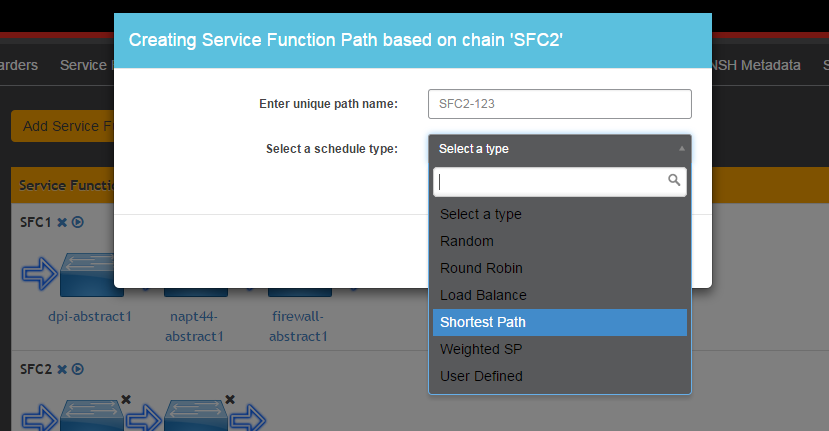
  • Deploy the SFC2(firewall-abstract2⇒napt44-abstract2), select “Shortest Path” as schedule type and click button to Create Rendered Service Path in SFC UI (http://localhost:8181/sfc/index.html).
select schedule type

select schedule type

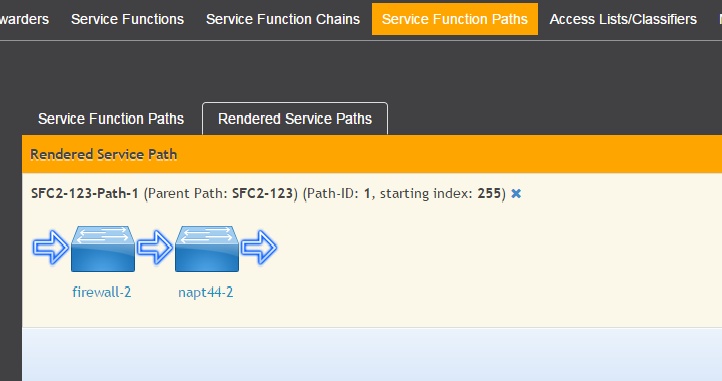
  • Verify the Rendered Service Path to ensure the selected hops are linked in one SFF. The correct RSP is firewall-1⇒napt44-1 or firewall-2⇒napt44-2. The first SF type is Firewall in Service Function Chain. So the algorithm will select first Hop randomly among all the SFs type is Firewall. Assume the first selected SF is firewall-2. All the path from firewall-1 to SF which type is Napt44 are list:
    • Path1: firewall-2 → sff2 → napt44-2
    • Path2: firewall-2 → sff2 → sff3 → sff1 → napt44-1 The shortest path is Path1, so the selected next hop is napt44-2.
rendered service path

rendered service path

Service Function Load Balancing User Guide

Overview

SFC Load-Balancing feature implements load balancing of Service Functions, rather than a one-to-one mapping between Service-Function-Forwarder and Service-Function.

Load Balancing Architecture

Service Function Groups (SFG) can replace Service Functions (SF) in the Rendered Path model. A Service Path can only be defined using SFGs or SFs, but not a combination of both.

Relevant objects in the YANG model are as follows:

  1. Service-Function-Group-Algorithm:

    Service-Function-Group-Algorithms {
        Service-Function-Group-Algorithm {
            String name
            String type
        }
    }
    
    Available types: ALL, SELECT, INDIRECT, FAST_FAILURE
    
  2. Service-Function-Group:

    Service-Function-Groups {
        Service-Function-Group {
            String name
            String serviceFunctionGroupAlgorithmName
            String type
            String groupId
            Service-Function-Group-Element {
                String service-function-name
                int index
            }
        }
    }
    
  3. ServiceFunctionHop: holds a reference to a name of SFG (or SF)

Tutorials

This tutorial will explain how to create a simple SFC configuration, with SFG instead of SF. In this example, the SFG will include two existing SF.

Setup SFC

For general SFC setup and scenarios, please see the SFC wiki page: https://wiki.opendaylight.org/view/Service_Function_Chaining:Main#SFC_101

Create an algorithm

POST - http://127.0.0.1:8181/restconf/config/service-function-group-algorithm:service-function-group-algorithms

{
    "service-function-group-algorithm": [
      {
        "name": "alg1"
        "type": "ALL"
      }
   ]
}

(Header “content-type”: application/json)

Create a group

POST - http://127.0.0.1:8181/restconf/config/service-function-group:service-function-groups

{
    "service-function-group": [
    {
        "rest-uri": "http://localhost:10002",
        "ip-mgmt-address": "10.3.1.103",
        "algorithm": "alg1",
        "name": "SFG1",
        "type": "service-function-type:napt44",
        "sfc-service-function": [
            {
                "name":"napt44-104"
            },
            {
                "name":"napt44-103-1"
            }
        ]
      }
    ]
}

SFC Proof of Transit User Guide

Overview

Early Service Function Chaining (SFC) Proof of Transit (SFC Proof of Transit) implements Service Chaining Proof of Transit functionality on capable switches. After the creation of an Rendered Service Path (RSP), a user can configure to enable SFC proof of transit on the selected RSP to effect the proof of transit.

Common acronyms used in the following sections:

  • SF - Service Function
  • SFF - Service Function Forwarder
  • SFC - Service Function Chain
  • SFP - Service Function Path
  • RSP - Rendered Service Path
  • SFCPOT - Service Function Chain Proof of Transit

SFC Proof of Transit Architecture

When SFC Proof of Transit is initialized, all required listeners are registered to handle incoming data. It involves SfcPotNodeListener which stores data about all node devices including their mountpoints (used here as databrokers), SfcPotRSPDataListener, RenderedPathListener. RenderedPathListener is used to listen for RSP changes. SfcPotRSPDataListener implements RPC services to enable or disable SFC Proof of Transit on a particular RSP. When the SFC Proof of Transit is invoked, RSP listeners and service implementations are setup to receive SFCPOT configurations. When a user configures via a POST RPC call to enable SFCPOT on a particular RSP, the configuration drives the creation of necessary augmentations to the RSP to effect the SFCPOT configurations.

SFC Proof of Transit details

Several deployments use traffic engineering, policy routing, segment routing or service function chaining (SFC) to steer packets through a specific set of nodes. In certain cases regulatory obligations or a compliance policy require to prove that all packets that are supposed to follow a specific path are indeed being forwarded across the exact set of nodes specified. I.e. if a packet flow is supposed to go through a series of service functions or network nodes, it has to be proven that all packets of the flow actually went through the service chain or collection of nodes specified by the policy. In case the packets of a flow weren’t appropriately processed, a proof of transit egress device would be required to identify the policy violation and take corresponding actions (e.g. drop or redirect the packet, send an alert etc.) corresponding to the policy.

The SFCPOT approach is based on meta-data which is added to every packet. The meta data is updated at every hop and is used to verify whether a packet traversed all required nodes. A particular path is either described by a set of secret keys, or a set of shares of a single secret. Nodes on the path retrieve their individual keys or shares of a key (using for e.g. Shamir’s Shared Sharing Secret scheme) from a central controller. The complete key set is only known to the verifier- which is typically the ultimate node on a path that requires proof of transit. Each node in the path uses its secret or share of the secret to update the meta-data of the packets as the packets pass through the node. When the verifier receives a packet, it can use its key(s) along with the meta-data to validate whether the packet traversed the service chain correctly.

SFC Proof of Transit entities

In order to implement SFC Proof of Transit for a service function chain, an RSP is a pre-requisite to identify the SFC to enable SFC PoT on. SFC Proof of Transit for a particular RSP is enabled by an RPC request to the controller along with necessary parameters to control some of the aspects of the SFC Proof of Transit process.

The RPC handler identifies the RSP and generates SFC Proof of Transit parameters like secret share, secret etc., and adds the generated SFCPOT configuration parameters to SFC main as well as the various SFC hops. The last node in the SFC is configured as a verifier node to allow SFCPOT Proof of Transit process to be completed.

The SFCPOT configuration generators and related handling are done by SfcPotAPI, SfcPotConfigGenerator, SfcPotListener, SfcPotPolyAPI, SfcPotPolyClassAPI and SfcPotPolyClass.

Administering SFC Proof of Transit

To use the SFC Proof of Transit Karaf, at least the following Karaf features must be installed:

  • odl-sfc-model
  • odl-sfc-provider
  • odl-sfc-netconf
  • odl-restconf
  • odl-netconf-topology
  • odl-netconf-connector-all
  • odl-sfc-pot

SFC Proof of Transit Tutorial

Overview

This tutorial is a simple example how to configure Service Function Chain Proof of Transit using SFC POT feature.

Preconditions

To enable a device to handle SFC Proof of Transit, it is expected that the netconf server device advertise capability as under ioam-scv.yang present under src/main/yang folder of sfc-pot feature. It is also expected that netconf notifications be enabled and its support capability advertised as capabilities.

It is also expected that the devices are netconf mounted and available in the topology-netconf store.

Instructions

When SFC Proof of Transit is installed, all netconf nodes in topology-netconf are processed and all capable nodes with accessible mountpoints are cached.

First step is to create the required RSP as usually done.

Once RSP name is avaiable it is used to send a POST RPC to the controller similar to below:

POST ./restconf/operations/sfc-ioam-nb-pot:enable-sfc-ioam-pot-rendered-path

{
  "input": {
    "sfc-ioam-pot-rsp-name": "rsp1"
  }
}

The following can be used to disable the SFC Proof of Transit on an RSP which removes the augmentations and stores back the RSP without the SFCPOT enabled features and also sending down a delete configuration to the SFCPOT configuration sub-tree in the nodes.

POST ./restconf/operations/sfc-ioam-nb-pot:disable-sfc-ioam-pot-rendered-path

{
  "input": {
    "sfc-ioam-pot-rsp-name": "rsp1"
  }
}