This document is for a deprecated release of Opendaylight and will receive only security updates.
This page explains how the OpenDaylight release process works once the TSC has approved a release.
After release candidate is built gpg sign artifacts using odlsign-bulk script in releng/builder/scripts.
cd scripts/
./odlsign-bulk STAGING_REPO_ID  # eg. autorelease-1367
Block submit permissions for registered users and elevate RE’s committer rights on gerrit.
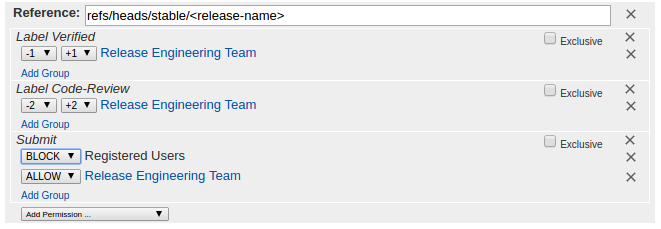
Note
Enable Exclusive checkbox
Export ${RELEASE} and ${BUILDNUM} with current release name and build number.
export RELEASE=Beryllium-SR4
export BRANCH=${RELEASE//-*}
export BUILDNUM=55
Nexus: click release for staging repo (Helpdesk)
Send email to Helpdesk with binary URL to update website (Helpdesk)
Send email to TSC and Release mailing lists announcing release binaries location (Release Engineering Team)
Clone autorelease repository. (Release Engineering Team)
git clone --recursive https://git.opendaylight.org/gerrit/releng/autorelease
Checkout autorelease and switch to release branch eg stable/carbon (Release Engineering Team)
git checkout -b stable/${BRANCH,,} origin/stable/${BRANCH,,}
git submodule update --init
git submodule foreach git checkout -b stable/${BRANCH,,} origin/stable/${BRANCH,,}
Make sure your git repo is setup to push (use git-review)
git review -s
git submodule foreach 'git review -s'
Download patches (*.bundle files and taglist.log.gz) from log server.
mkdir /tmp/patches && cd /tmp/patches
wget https://logs.opendaylight.org/releng/jenkins092/autorelease-release-${BRANCH,,}/${BUILDNUM}/archives/all-bundles.tar.gz
gunzip all-bundles.tar.gz
wget https://logs.opendaylight.org/releng/jenkins092/autorelease-release-${BRANCH,,}/${BUILDNUM}/archives/patches/taglist.log.gz
gunzip taglist.log.gz
Run the following commands for every project in the release, to apply patches to each project directory.
pip install lftools
lftools version patch ${RELEASE}
git review -y -t ${RELEASE}
git push gerrit release/${RELEASE,,}
Merge all patches on gerrit in the order generated by merge-order.log
Tag autorelease too
git checkout `cat /tmp/patches/taglist.log | grep autorelease | awk '{print $2}'`
git submodule foreach git checkout release/${RELEASE,,}
git commit -asSm "Release ${RELEASE}"
git tag -asm "OpenDaylight ${RELEASE} release" release/${RELEASE,,}
git push gerrit release/${RELEASE,,}
Re-enable submit permissions for registered users and disable elevated RE committer rights on gerrit.
Release notes is auto generated by job autorelease-generate-release-notes-${BRANCH,,} triggered at the end of every autorelease build. The release notes file (release_notes.rst) is available under archives.
Alternatively, release notes can also be manually generated with the script. (Release Engineering Team)
git checkout stable/${BRANCH,,}
cd scripts/release_notes_management/ && ./build.sh
The output file (release_notes.rst) generated by the build script is available under autorelease/scripts/release_notes_management/projects/.
Send email to release/tsc/dev notifying tagging and version bump complete (Release Engineering Team)
